Empty Fill Check Errors
An Empty Fill Check error occurs when the Optical Reader detects an abnormally high level of fluorescence in what should be an empty cartridge.
Empty Fill Check Fluorescence error is based on the level of fluoresce present at the 585/610 (ROX) optics channel detector. Note that the emitter on this channel produces orange light with a wavelength of 585 nanometers, and the detector looks for fluorescence at a wave length of 610 nanometers.
This channel is referred to as 585/610 channel one in CSV files, and as channel zero in log files, Script-O-Matic, and database.
The purpose of an Empty Fill Check error is to detect previously used cartridges. Since the BD MAX record’s cartridge barcodes in its database this is usually not an issue at sites with a single BD MAX. However, if a site has multiple BD MAX instruments, then this can become an issue.
In the case of unused cartridges, Empty Fill Check errors can be related to one or more of several different issues. Sometimes this is referred to as a stacking error.
Looking at a cross section of the Optics system there are multiple elements that can come into play for this type of error. The diagram shows the various parts that can be involved during an Empty Fill Check.
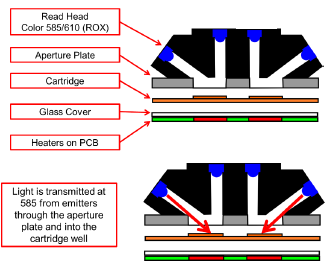
When an Empty Fill Check is performed, the Optics emitters transmit light at a wavelength of 585 nanometers. This light is going to illuminate the aperture plate, the cartridge chamber being tested, and the glass plate covering the heater elements below the cartridge.
Any stray foreign substances located on the optics head, aperture plate, cartridge, or glass heater cover can cause fluorescence at 610 nm. Additionally, fluorescence from all sources is added to get the total fluorescence.
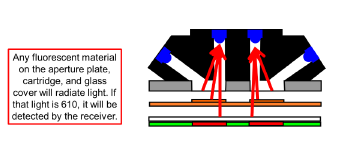
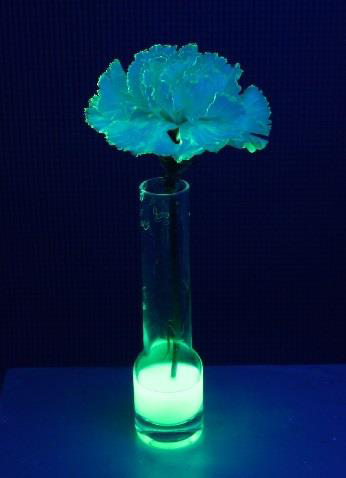
Almost any material can produce fluorescence when exposed to light of various frequencies. For instance, an ordinary flower under a black (Ultra Violet) light can glow.
- During the day time and in normal lighting, this fluorescence is not visible because it is much dimmer than the light we see by.
- Put the object in a dark room and illuminate it with light of a specific wave length and it appears to glow. This is what can happen with foreign substances inside the BD MAX reader. In the dark they can be made to emit fluorescence when the channel emitters are turned on.
Empty Fill Check is conducted after Cataloging and prior to the start of sample preparation.
Conditions that may create Empty Fill Checks are listed below, a single condition or combination of these conditions may lead to an Empty Fill Check being displayed on the BD MAX instrument:
- Debris on the Reader Aperture plate.
- Debris on the Heater/MUX glass plate.
- PCR Cartridges that are dirty or have too much natural fluorescence (i.e. plastic has some fluorescence associated with it).
- PCR Cartridges that have already been used for assay testing.
Troubleshoot with Empty Fill Check Test Function
For software version V4.50 and up, the Empty Fill Check Test function is available for improving service efficiency. The Empty Fill Check Test allows Field Service personnel to check the fluorescence reading of an empty cartridge right from the GUI.
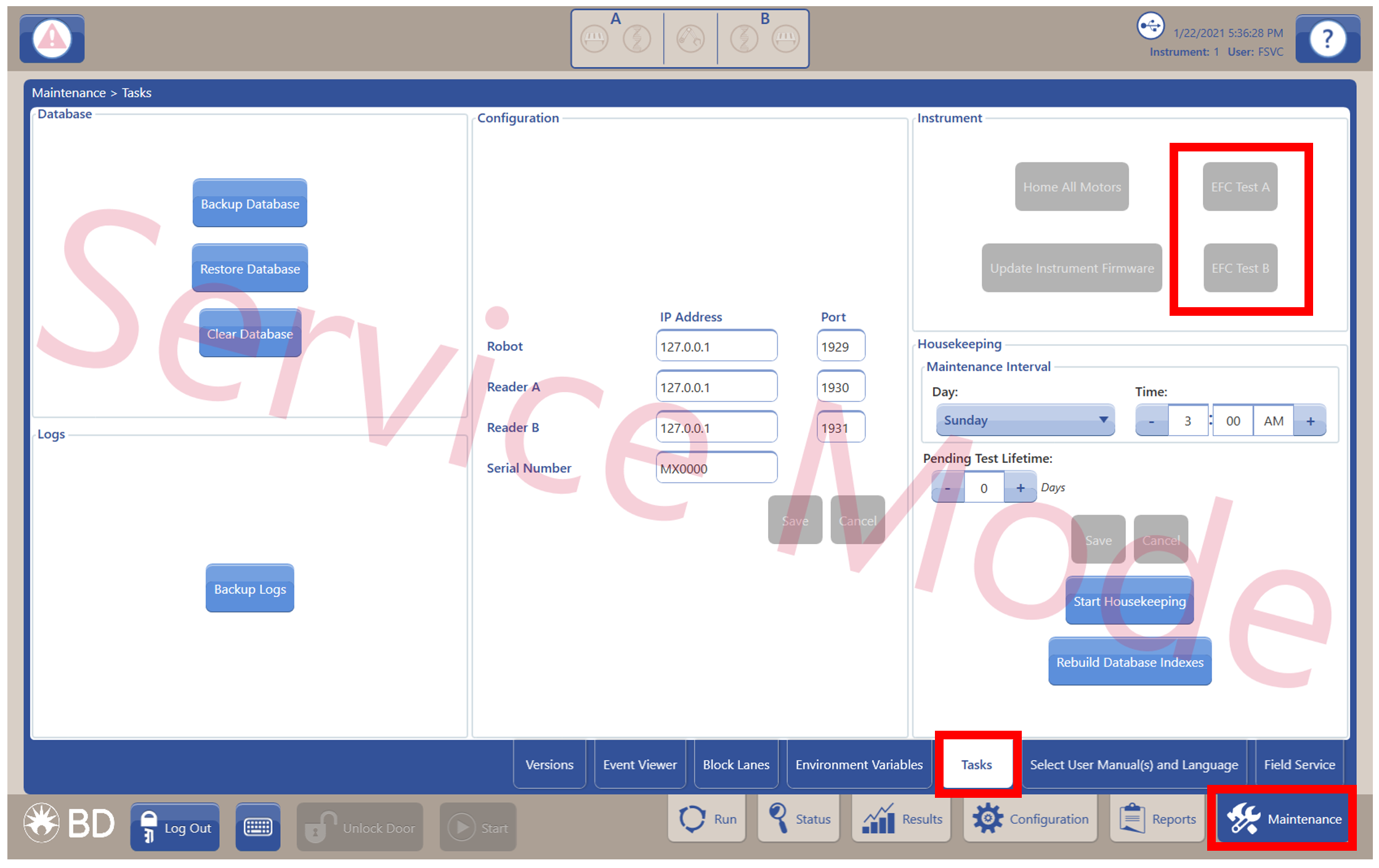
The EFC Test A and EFC Test B buttons can be found under the Task Sub-tab and is only available when logged in as FSVC user. Test buttons are disabled when the door is open, when there is an ongoing run, or when the Home All Motor is executing.
The following steps are performed when the Empty Fill Check Test is executed:
- The cartridge is scanned.
- The tray is closed and the pressure plate is raised.
- Fill check is performed.
- The pressure plate is lowered and the tray opens.
- The results are displayed in a report.
When test is completed, the results are shown on a report in the test window. This result may be viewed, exported as PDF onto a USB drive, or printed. Once the test window is closed, the report cannot be recalled.
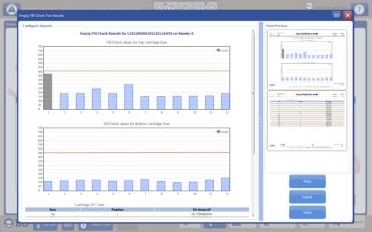
When the test is completed, the results for all 24 lanes are displayed in a bar graph format. Lanes in gray color represents known/used lanes, and lanes in blue color represent unknown/unused lanes. The values displayed on the Y-axis are normalized value multiplied by the AF, and the red threshold line of 450 is displayed across the bar chart. In addition to the fluorescence value, the report also contains the instrument serial number, software version, reader tested, and cartridge barcode.
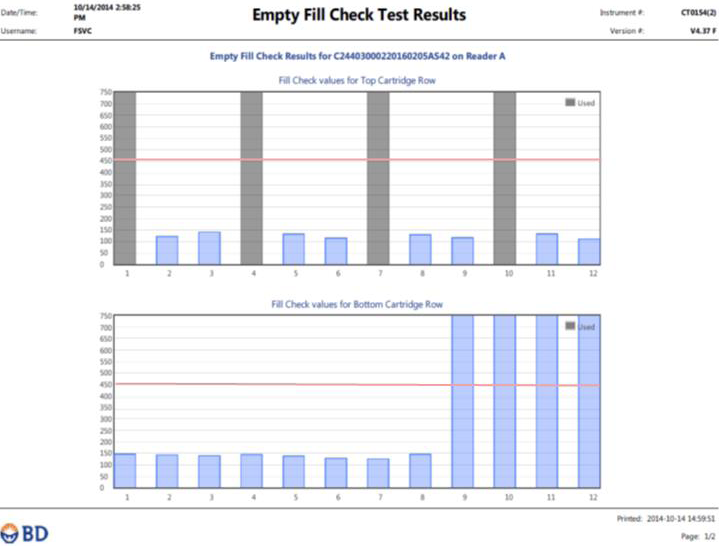
- In the figure above, lanes 1, 4, 7 and 10 are shown in Grey color, meaning that they have been used and are known to the database. Lanes 9, 10, 11, and 12 on the bottom row were blocked during the test and are shown in blue color, meaning they are unknown in the database. The remaining lanes are all unused lanes and are under the threshold of 450.
To run the Empty Fill Check Test:
- Log in as FSVC user.
- Navigate to the Task screen under Maintenance tab.
- Select either the EFC Test A button for testing Reader A or EFC Test B button for testing Reader B.
- Place a new PCR Cartridge in the reader you wish to test.
- Select the appropriate EFC Test button to execute the test.
- When test is started, an EFC Test window displays.
Do not close the window; closing the window at this time terminates the test.
- When the test completes, a report is generated and displayed. The report can also be printed or exported as a PDF. Once the window is closed, the report cannot be recalled.
- Log out of service mode and verify the service watermark is no longer present prior to returning the instrument to the customer.